TRÊN MÁY BẠN · CHẠY OFFLINE · WINDOWS · MUA MỘT LẦN

ON YOUR COMPUTER · WORKS OFFLINE · WINDOWS · ONE-TIME PURCHASE

Trợ lý tri thức hiểu nghề của bạn.

A knowledge assistant that understands your profession.

Chọn nghề của bạn. Memory Palace đọc chính tài liệu của bạn rồi làm ra đúng sản phẩm công việc của nghề đó: FAQ vận hành, memo kế toán, tóm tắt ca bệnh, dự toán xây dựng hay brief ra quyết định. Mỗi câu trả lời đều trích dẫn về đúng nguồn của bạn — không bịa, cái chưa có thì đánh dấu rõ. Đầu ra mang thương hiệu của bạn, và mọi tài liệu đều nằm yên trên máy bạn.

Pick your profession. Memory Palace reads your own documents and produces the real work-products of that trade: an operations FAQ, an accounting memo, a clinical case summary, a construction cost estimate, a decision brief. Every answer cites your own sources — no invention, and what's missing is flagged. The output carries your brand, and your files stay on your computer.

Xem 5 gói nghề See the 5 profession packs

Không cần biết kỹ thuật. Kéo thả được là dùng được.

No technical skill needed. If you can drag a file, you can use this.

Windows 10/11 · Không cần thẻ tín dụng · Hoàn tiền 30 ngày · Tài liệu của bạn không bao giờ rời khỏi máy

Windows 10/11 · No credit card · 30-day money-back · Your files never leave your computer

Vì sao khác

Why it's different

Không phải một AI chung chung.
Một trợ lý hiểu nghề của bạn.

Not a generic AI.
An assistant that knows your trade.

"AI thường biết mọi thứ trừ công việc cụ thể của tôi. Tôi không cần một câu trả lời đẹp — tôi cần đúng cái biên bản, cái memo, cái dự toán mà nghề tôi phải nộp, dựa trên đúng tài liệu của tôi."
"Generic AI knows everything except my actual job. I don't need a polished answer — I need the exact report, memo, or estimate my trade has to deliver, built from my own documents."
Tài liệu không rời máy
Local-first
Riêng tư theo mặc định
Private by default
Hồ sơ khách, bệnh án, hợp đồng, báo giá — toàn dữ liệu không được phép lên cloud. Memory Palace chạy ngay trên máy bạn, không có máy chủ nào ở giữa. Tài liệu của bạn ở yên một chỗ.
Client files, patient charts, contracts, quotes — data that can't go to the cloud. Memory Palace runs right on your computer, with no server in the middle. Your files stay put.
"Lần đầu tôi dùng AI cho hồ sơ thật mà không lo vi phạm bảo mật."
"First time I've used AI on real files without worrying about confidentiality."
Trích dẫn về đúng nguồn
Cites your sources
Không bịa, cái chưa có thì báo
No invention, gaps flagged
Mỗi câu trả lời chỉ rõ nó lấy từ tài liệu nào của bạn để bạn bấm vào kiểm chứng. Chỗ nào kho chưa có dữ liệu, app đánh dấu rõ thay vì bịa cho có — quan trọng khi đầu ra là công việc thật.
Every answer points back to which of your documents it came from, so you can verify. Where your library has no data, the app flags the gap instead of making something up — vital when the output is real work.
"Câu trả lời dựa trên kho của tôi, không phải trí nhớ chung của AI."
"Answers come from my library, not the AI's general memory."
Đầu ra là sản phẩm của nghề
Real work-products
Mang thương hiệu của bạn
On your brand
Không dừng ở "tóm tắt": app làm ra đúng biên bản, memo, dự toán, brief mà nghề bạn cần nộp, theo định dạng và thương hiệu của bạn. Kho là kho sống — nguồn đổi thì app tự báo để cập nhật.
It doesn't stop at "a summary": it produces the exact report, memo, estimate, or brief your trade has to deliver, in your format and brand. The library is alive — when a source changes, the app tells you to refresh.
"Tôi giao đúng sản phẩm của nghề, không phải một đoạn chat dán lại."
"I hand over my trade's actual deliverable, not a pasted chat reply."

5 gói nghề

5 profession packs

Chọn nghề của bạn.
Nhận đúng sản phẩm công việc.

Pick your profession.
Get its real work-products.

Cùng một bộ khung — tài liệu trên máy bạn, trích dẫn về đúng nguồn, đầu ra mang thương hiệu của bạn — nhưng mỗi gói biết rõ sản phẩm đặc trưng của nghề mình.

One shared spine — your files local, answers cited to your sources, output on your brand — but each pack knows the signature deliverables of its trade.

Vận hành BĐS & lưu trú

Property & hospitality ops

Căn hộ dịch vụ · homestay · quản lý tòa nhà

Serviced apartments · homestays · building management

Biến SOP, hợp đồng và ghi chú rời thành sổ tay vận hành tra được.

Turn SOPs, contracts and scattered notes into an operations handbook you can query.

  • FAQ vận hành & bàn giao ca
  • Sổ tay sự cố & onboard nhân viên
  • Operations FAQ & shift handover
  • Incident playbook & staff onboarding

Kế toán & Kiểm toán

Accounting & Audit

Kế toán doanh nghiệp · dịch vụ kế toán · kiểm toán

Corporate accounting · bookkeeping services · audit

Đối chiếu chứng từ và viết memo có trích dẫn về đúng điều khoản, đúng chứng từ.

Reconcile documents and draft memos that cite the exact clause and the exact voucher.

  • Đối chiếu chứng từ · memo kế toán/thuế
  • Hồ sơ làm việc & hồ sơ quyết toán
  • Document reconciliation · accounting/tax memo
  • Working papers & settlement files

Y tế lâm sàng

Clinical care

Hỗ trợ tài liệu · phi-chẩn-đoán

Documentation support · non-diagnostic

Hỗ trợ phần tài liệu, không thay thế chẩn đoán: tóm tắt và soạn giấy tờ từ chính hồ sơ của bạn.

Supports the paperwork, never the diagnosis: summarize and draft from your own records.

  • Tóm tắt ca SOAP & tài liệu bệnh nhân
  • Evidence digest & giấy chuyển tuyến
  • SOAP case summary & patient materials
  • Evidence digest & referral letters

Vật liệu & Xây dựng

Materials & Construction

Nhà thầu · tư vấn thiết kế · cung ứng vật liệu

Contractors · design consultants · materials supply

So sánh vật liệu, báo giá và viết thuyết minh kỹ thuật dựa trên đúng tài liệu dự án.

Compare materials and quotes, and write technical specs grounded in the project's own documents.

  • So sánh vật liệu/báo giá · thuyết minh kỹ thuật
  • Dự toán & biên bản nghiệm thu
  • Material/quote comparison · technical spec
  • Cost estimate & acceptance minutes

Đội/phòng — bộ não nội bộ

Team — internal brain

Trưởng nhóm · quản lý · phòng ban

Team leads · managers · departments

Gom tài liệu nội bộ thành bộ não chung của đội, để mọi quyết định bám đúng nguồn.

Pool internal documents into a shared team brain, so every decision traces back to a source.

  • Brief ra quyết định & theo dõi cam kết
  • Onboard đội & biên bản họp
  • Decision brief & commitment tracking
  • Team onboarding & meeting minutes

Không thấy nghề của mình? Bộ khung tri thức là chung — kho của bạn, trích dẫn về đúng nguồn, đầu ra theo thương hiệu — nên app vẫn dùng tốt cho phần lớn công việc tri thức. Xem chi tiết từng nghề →

Don't see your trade? The knowledge spine is shared — your library, cited answers, branded output — so it works well for most knowledge work. See each profession in detail →

Quy trình 3 bước đơn giản

A simple 3-step process

01

Thả vào

Drop it in

Kéo thả bất cứ thứ gì bạn đang đọc: file PDF, link web, hay video YouTube. App đọc được cả bản scan và video không có phụ đề.

Drag in anything you're reading: a PDF, a web link, or a YouTube video. It even reads scans and videos with no captions.

02

App đọc và sắp xếp

The app reads and organizes

App tự đọc và tóm tắt thành ghi chú gọn gàng. Tài liệu không rời khỏi máy bạn.

The app reads it and writes a clean summary note. Your files never leave your computer.

03

Kiến thức nối lại với nhau

Your knowledge connects itself

Mỗi ghi chú tự nối với những ghi chú liên quan. Bản đồ kiến thức lớn dần mà bạn không phải sắp xếp.

Each note links itself to related ones. Your knowledge map grows without you having to sort anything.

Vì sao chọn Memory Palace

Why Memory Palace

Năm điều khiến bạn
yên tâm dùng lâu dài.

Five reasons it earns
a permanent place on your computer.

Cả kho nằm gọn trong một thư mục của bạn

Your whole library lives in one folder you own

Mọi ghi chú đều là file văn bản thường, nằm trong một thư mục bạn tự chọn. Muốn sao lưu hay đổi máy? Chỉ cần copy thư mục đó sang USB hoặc máy khác — hoặc dùng nút gói cả kho thành một file để mang đi. Không có gì bị kẹt lại trong app, và một giấy phép dùng được trên mọi máy của bạn.

Every note is a plain text file inside a folder you choose. Backing up or moving to a new computer is just copying that folder to a USB drive or another PC — or use the one button that packs the whole vault into a single file to carry over. Nothing is trapped inside the app, and one license covers all your own machines.

Bạn chọn bộ não AI, và thấy giá trước khi chạy

You pick the AI brain, and see the price first

Bạn chọn AI nào sẽ đọc tài liệu: DeepSeek (rẻ nhất), hoặc ChatGPT, Claude, Gemini bằng chính tài khoản của bạn. Đổi lúc nào cũng được trong phần cài đặt. Trước khi chạy, app cho biết chi phí ước tính và ghi lại số tiền đã dùng — không bao giờ có hóa đơn bất ngờ.

You choose which AI does the reading: DeepSeek (the cheapest option), or ChatGPT, Claude, or Gemini using your own account. Switch between them anytime in settings. Before it runs, the app shows the estimated cost and keeps track of what you've spent — so no bill ever surprises you.

Trích dẫn thật, không phải câu trả lời bịa

Real citations, not made-up answers

Mỗi câu trả lời đều chỉ rõ nó lấy từ tài liệu nào của bạn. App chỉ liệt kê đúng những ghi chú đã được dùng làm nguồn, nên bạn bấm vào là xem lại bản gốc để tự kiểm chứng. Câu trả lời dựa trên kho của bạn, không phải trí nhớ chung của AI.

Every answer points back to which of your documents it came from. The app lists only the notes it actually used as sources, so you can click through and check the original yourself. Answers come from your library, not from the AI's general memory.

Biến video YouTube thành ghi chú, kể cả khi không có phụ đề

Turn YouTube videos into notes, even ones with no subtitles

Dán một đường link YouTube và app biến nó thành ghi chú tìm được. Có phụ đề thì app dùng phụ đề; không có thì app tự nghe và ghi lại nội dung ngay trên máy bạn — âm thanh không gửi đi đâu cả — rồi tóm tắt lại. Tiếng nói rõ cho kết quả tốt nhất.

Paste a YouTube link and the app turns it into searchable notes. If the video has captions it uses them; if it has none, the app listens and writes the content down right on your computer — the audio never leaves it — then summarizes. Clear audio gives the best result.

Một kho tài liệu, sáu kiểu sản phẩm

One library, six kinds of deliverables

Từ cùng một kho, mỗi thứ chỉ một câu lệnh, app xuất ra đúng cái bạn cần lúc đó: báo cáo phân tích, bản tóm tắt ngắn, slide thuyết trình, file PowerPoint chỉnh sửa được, biểu đồ, và canvas sơ đồ tư duy.

From the same knowledge base, each with a single command, the app produces whatever you need at the moment: an analysis report, a short summary, a slide deck, an editable PowerPoint file, charts, and a visual mind-map canvas.

Xem ví dụ ngay dưới ↓ See examples below ↓

Nhìn thấy là hiểu

See it in action

Giao diện phần mềm thực tế

The real software interface

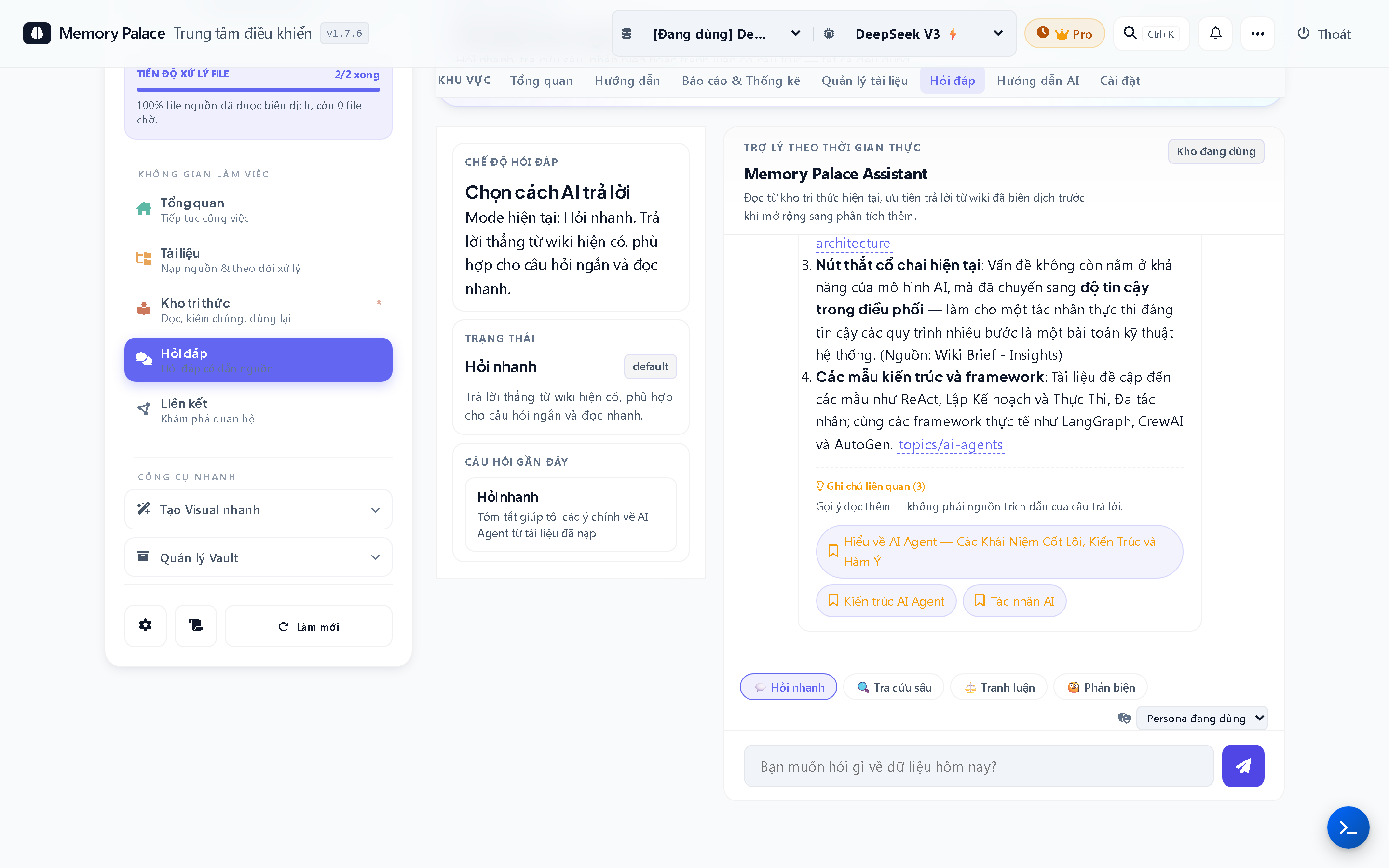
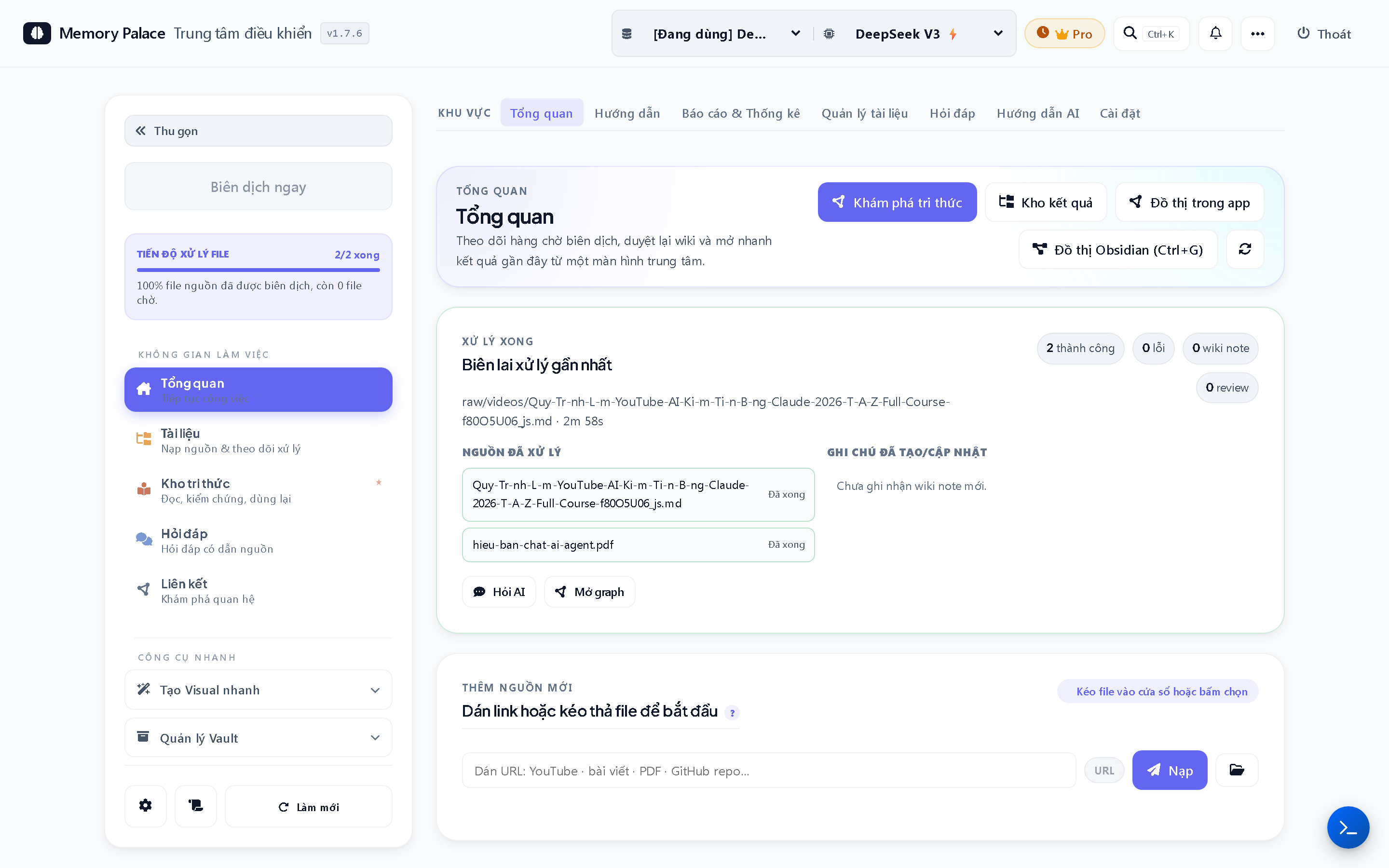
Memory Palace dashboard showing knowledge base progress metrics
Bảng điều khiển — tiến độ kho tri thức Dashboard — knowledge base progress
AI chat interface grounded in your ingested sources
Hỏi đáp AI dựa trên nguồn đã nạp Ask AI, grounded in your sources
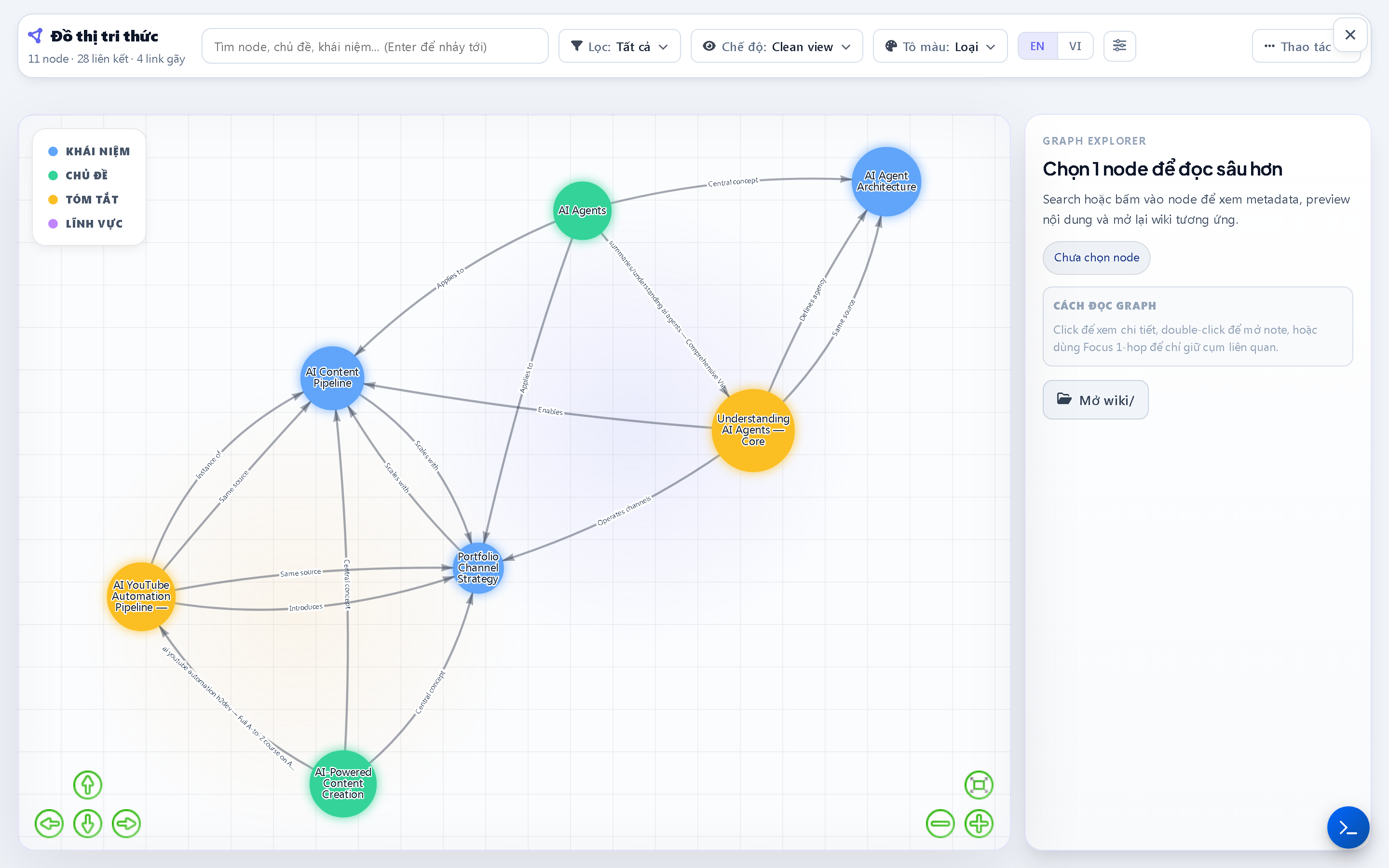
Knowledge graph showing linked concepts across your library
Đồ thị tri thức liên kết khái niệm Knowledge graph of linked concepts
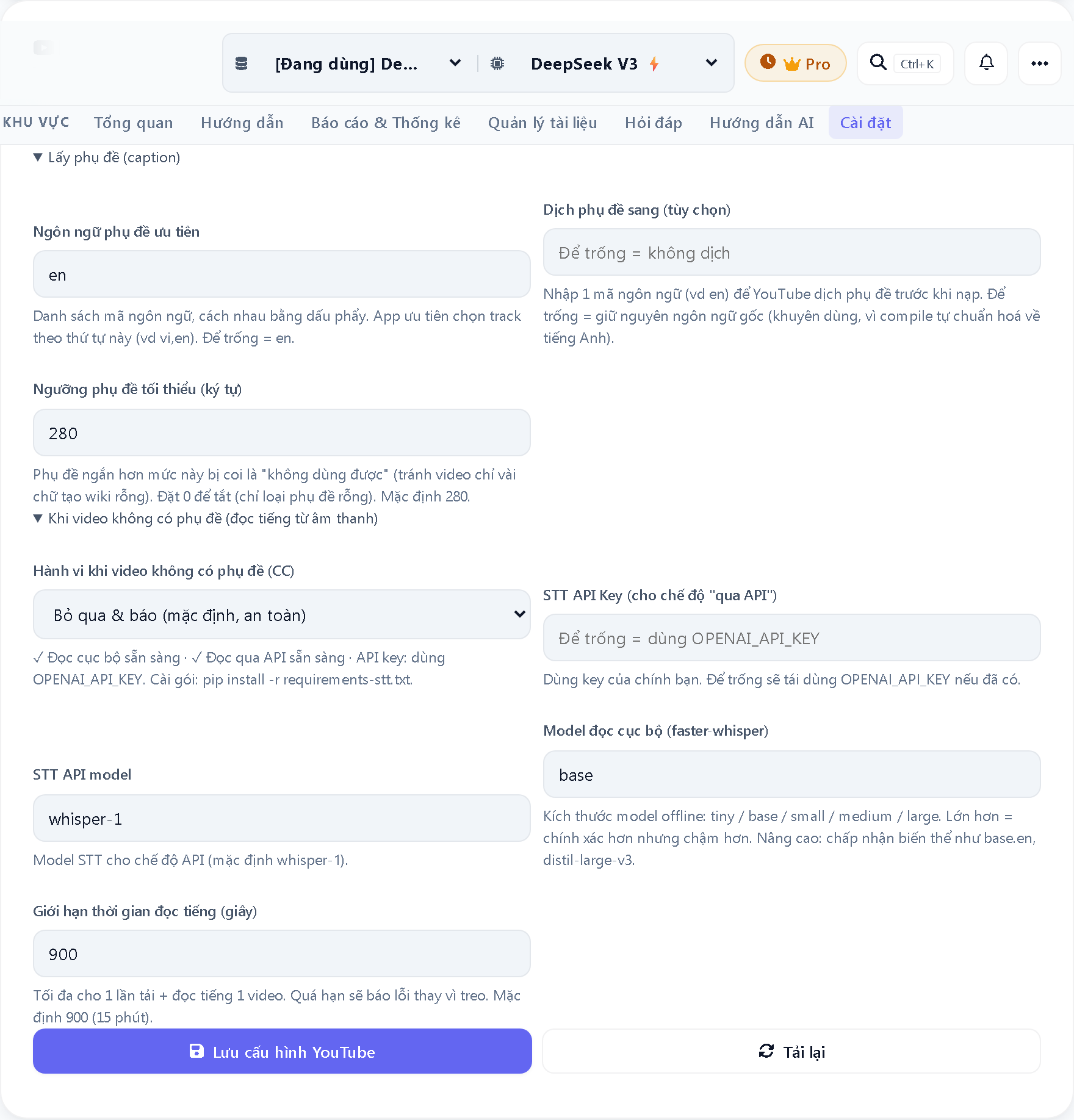
Settings panel for YouTube ingest and speech-to-text configuration
Nạp YouTube & đọc tiếng (STT) YouTube ingest & speech-to-text
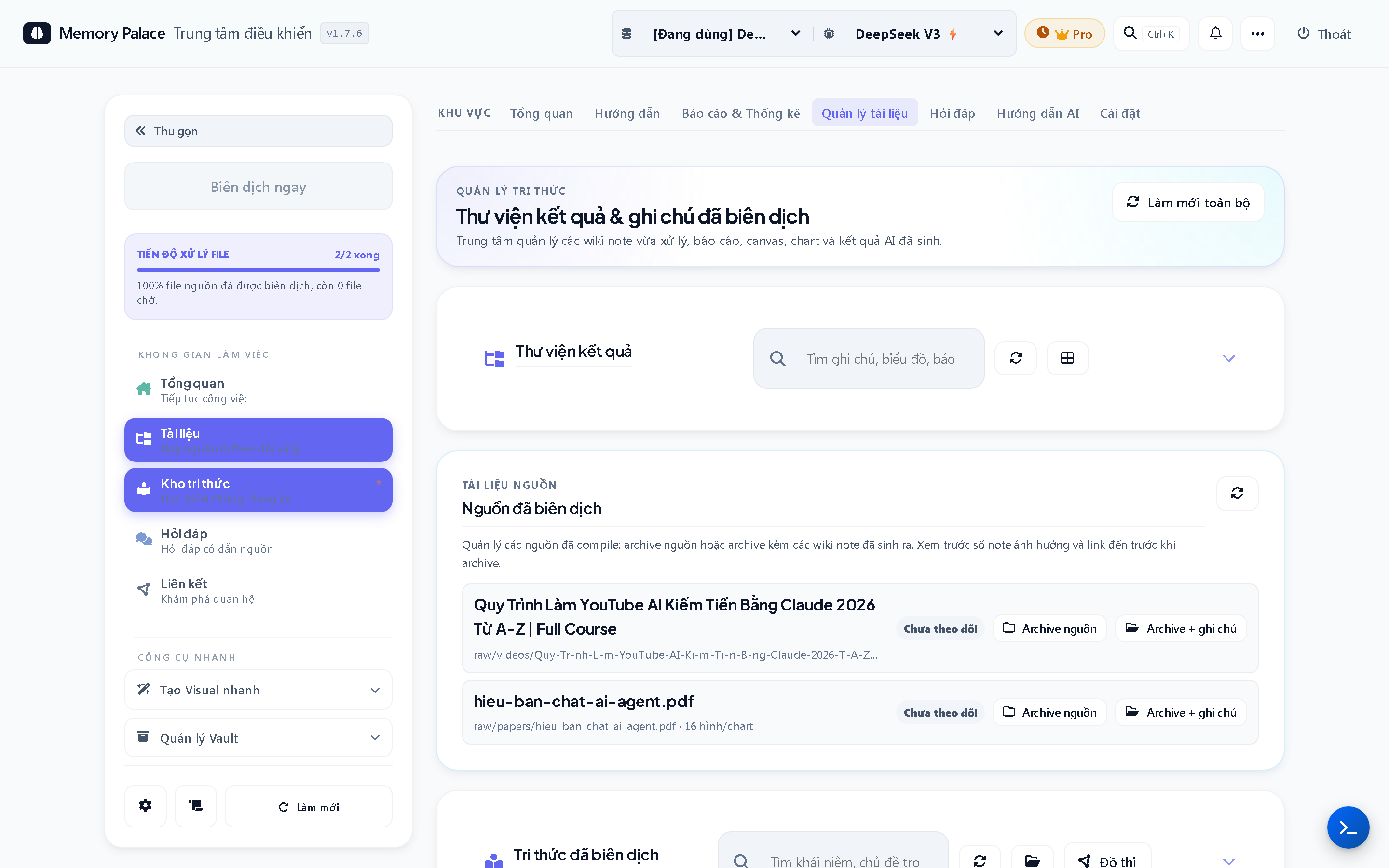
Source library showing ingested YouTube videos and PDF documents
Nguồn đã nạp: video YouTube + PDF Ingested sources: YouTube video + PDF

Sản phẩm đầu ra

What it generates

Từ tài liệu đến sản phẩm.

From documents to finished work.

Cùng một kho tài liệu, bạn hỏi một câu là có ngay thứ cần dùng: báo cáo, slide thuyết trình, biểu đồ, hay canvas sơ đồ tư duy.

From the same library, one question gives you what you need: a report, a slide deck, a chart, or a mind-map canvas.

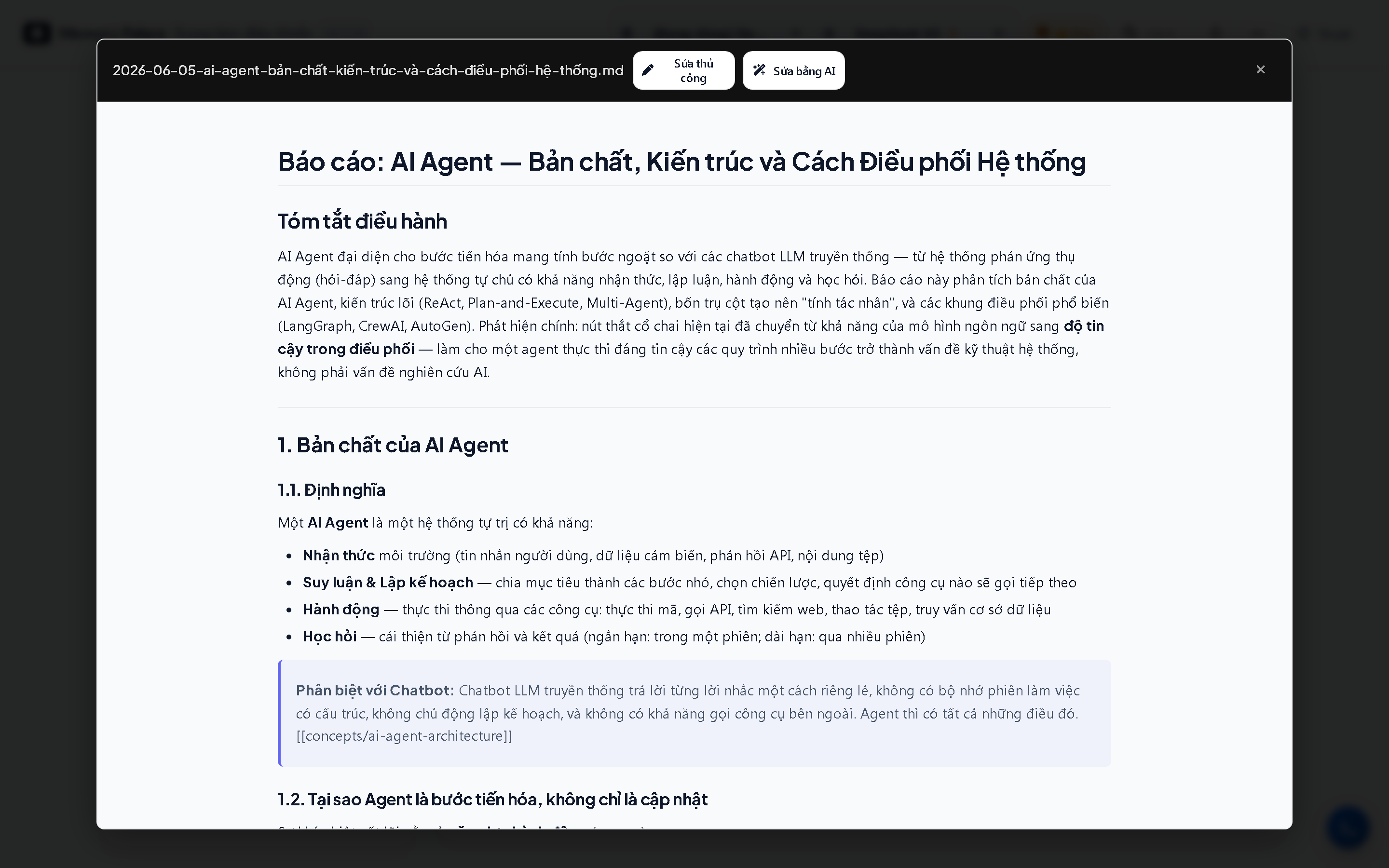
Auto-generated analysis report in Markdown format inside Memory Palace
Báo cáo phân tích tự động (Markdown) Auto-generated analysis report (Markdown)
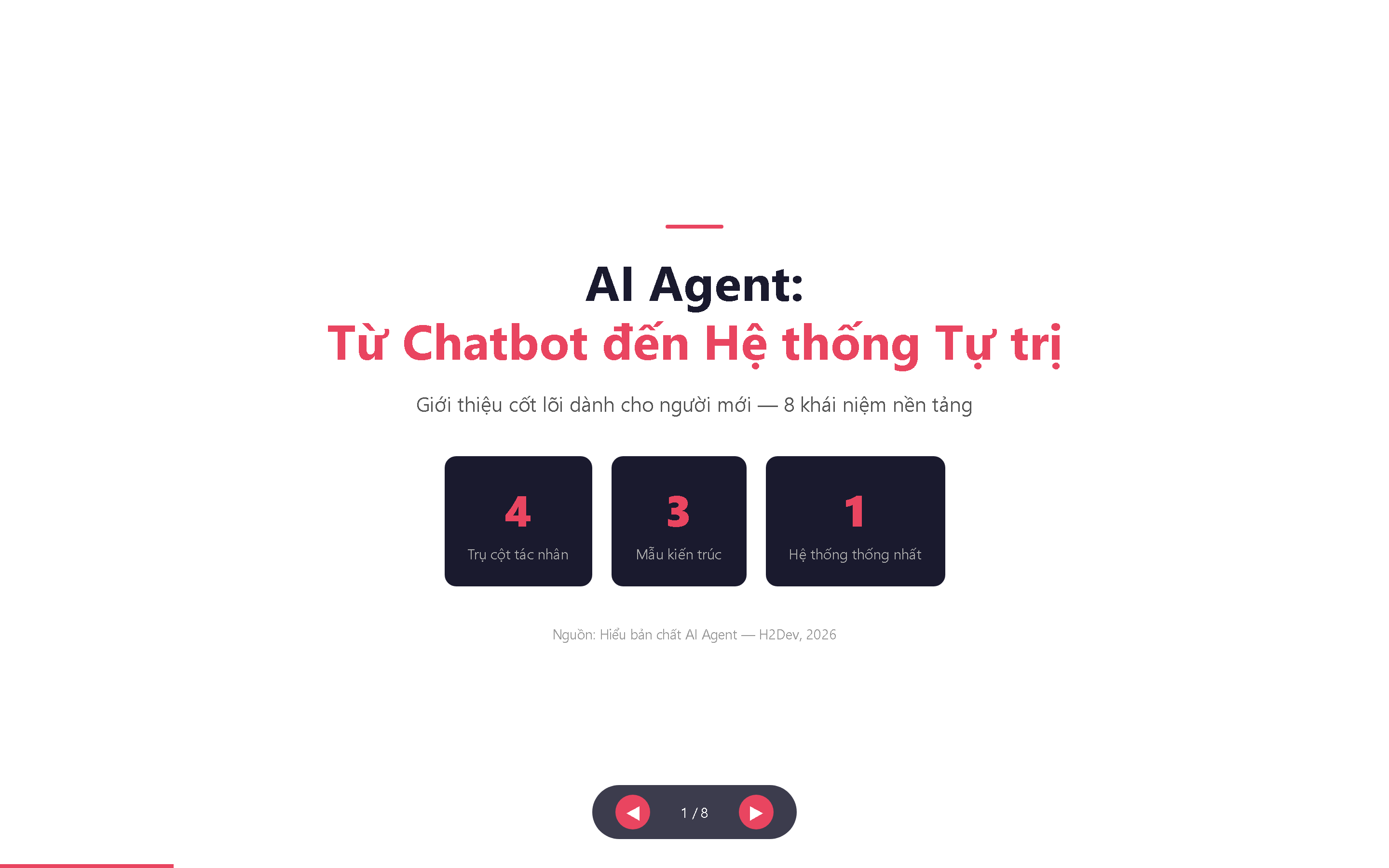
Presentation slide deck exported to HTML and PowerPoint from Memory Palace
Slide thuyết trình — xuất ra HTML & PowerPoint (.pptx) Presentation deck — exports to HTML & PowerPoint (.pptx)
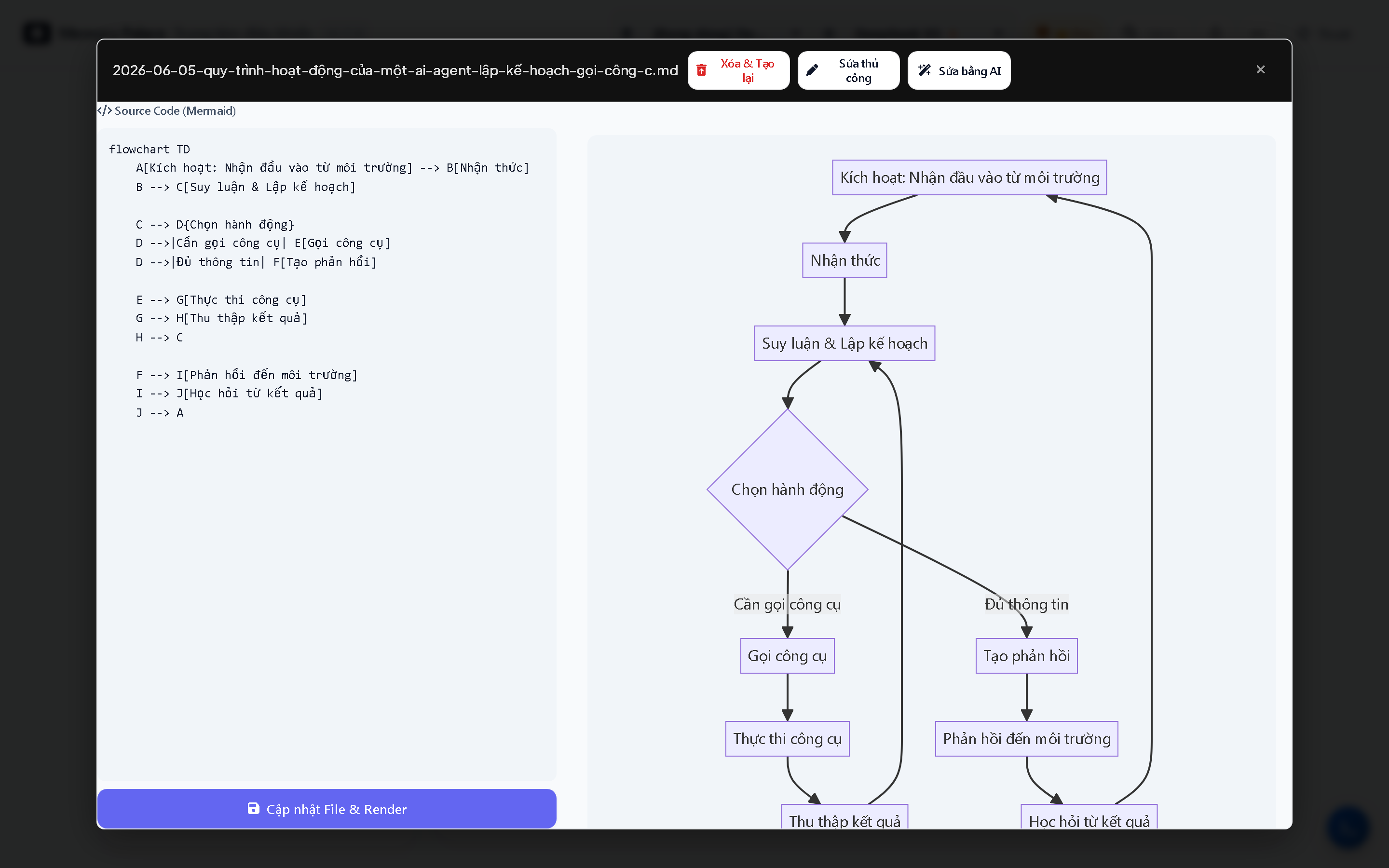
Mermaid diagram and chart generated from ingested documents
Sơ đồ & biểu đồ (Mermaid) Diagrams & charts (Mermaid)
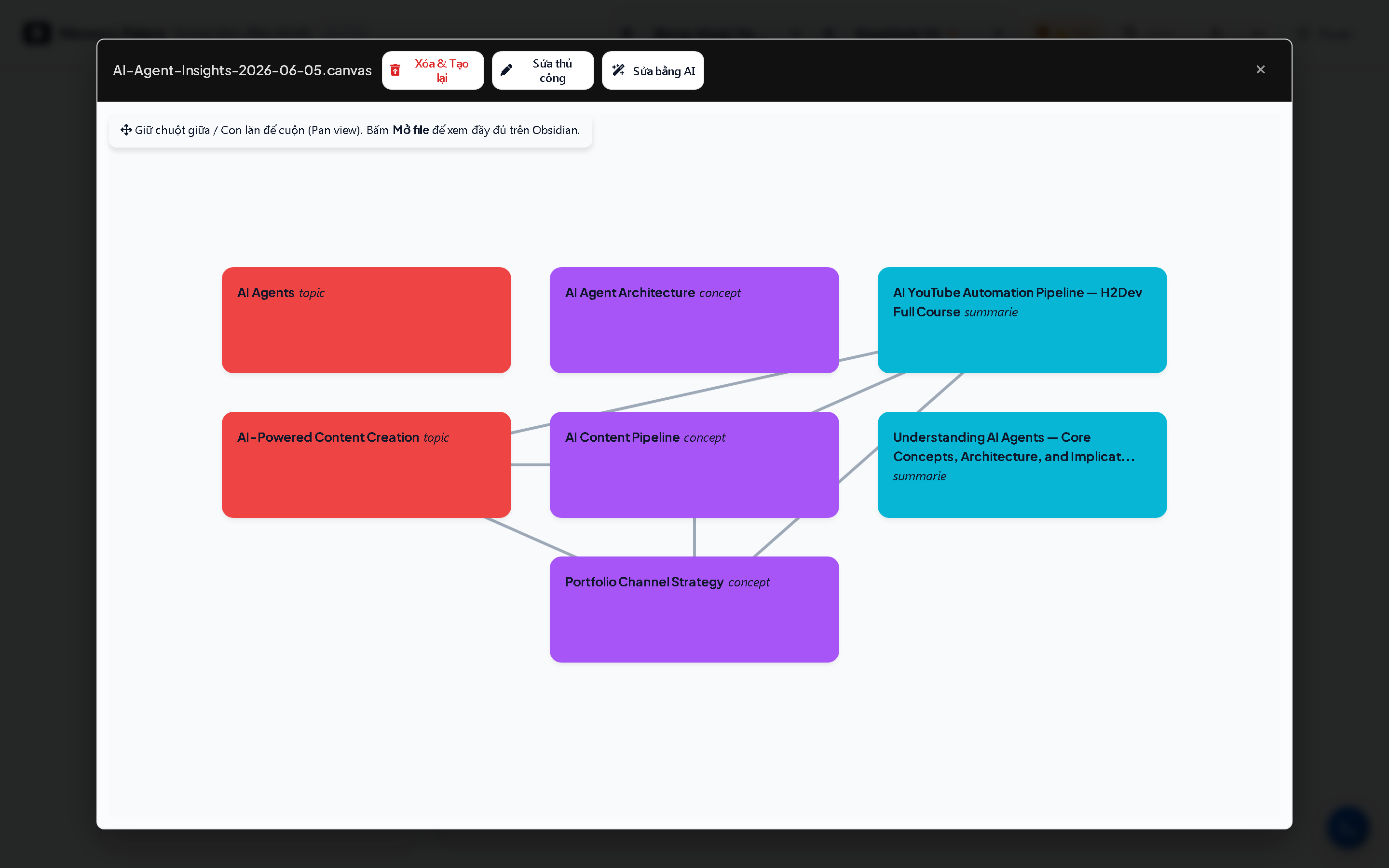
Canvas visual knowledge board showing linked concepts and mind map
Canvas — bản đồ tư duy trực quan Canvas — visual knowledge board

Thấy hợp với bạn rồi chứ? Dùng thử miễn phí 15 ngày, không cần thẻ tín dụng.

Sounds like a fit? Try it free for 15 days, no credit card needed.

Nhận bản dùng thử Get the free trial

Bạn từng ngại upload file lên ChatGPT chưa?

Ever hesitated to upload a file to ChatGPT?

Luật sư với hồ sơ đầy tên thật khách hàng. Bác sĩ thì không thể dán bệnh án vào ChatGPT. Tư vấn viên bị ràng buộc bởi cam kết bảo mật với khách. Còn nghiên cứu sinh có dữ liệu vốn không được phép đưa lên cloud. Với những tài liệu như vậy, dán thẳng vào ChatGPT hay tải lên NotebookLM là điều khiến nhiều người chần chừ.

A lawyer with case files full of real client names. A doctor who can't paste patient charts into ChatGPT. A consultant bound by a confidentiality agreement. And a researcher whose data was never allowed on the cloud in the first place. With files like these, pasting them into ChatGPT or uploading them to NotebookLM is what makes people hesitate.

Lý do đơn giản: những app đó cần tài liệu của bạn nằm trên máy chủ của họ thì mới làm việc được. Memory Palace thì khác: không có máy chủ nào ở giữa. Tài liệu luôn nằm yên trên máy bạn. Khi cần tóm tắt, máy của bạn tự gửi đúng phần nội dung cần thiết tới AI (bằng tài khoản của chính bạn) rồi nhận kết quả về. Tụi mình không bao giờ thấy, không lưu, và không đọc tài liệu của bạn.

The reason is simple: those apps need your files sitting on their servers to work. Memory Palace is different — there's no server in the middle. Your files always stay on your computer. When a summary is needed, your machine sends just the necessary text to the AI (under your own account) and gets the answer back. We never see, store, or read your documents.

Ghi chú tạo ra là file văn bản thường, nằm trong thư mục bạn chọn, mở được bằng bất kỳ app nào. Bạn không bị giữ chân. Đây là nguyên tắc cốt lõi của tụi mình, và sẽ luôn như vậy về sau.

The notes it creates are plain text files in a folder you choose. Open them in any app. You're never locked in — this is a core principle, not a feature that could be removed later.

So với ChatGPT & NotebookLM

Memory Palace vs ChatGPT & NotebookLM

Memory Palace ChatGPT NotebookLM
Tài liệu nằm yên trên máy bạn, không phải tải lên đâu cảFiles stay on your computer, nothing to upload
Trả lời có ghi rõ trích từ tài liệu nào của bạnAnswers point back to which of your files they came from Tùy lúcSometimes
Ghi chú là file của bạn, giữ được cả khi ngừng dùng appNotes are your own files, yours even if you stop using the app
Dùng được cả khi không có mạng*Works even with no internet*
Chi phíCost Trả một lầnPay once Trả hàng thángMonthly fee Google trợ giá**Google subsidized**

* Chạy offline khi bạn dùng AI cài sẵn trên máy. Nếu chọn ChatGPT, Claude hay Gemini thì vẫn cần mạng để gọi AI.

* Runs offline when you use the on-device AI. If you pick ChatGPT, Claude or Gemini, you still need internet to call the AI.

** NotebookLM "miễn phí" là vì Google trợ giá — đổi lại, tài liệu của bạn phải tải lên cloud của Google.

** NotebookLM is "free" because Google subsidizes it — in exchange, your files are uploaded to Google's cloud.

Mua một lần. Dùng vĩnh viễn.
Không phí hàng tháng.

Pay once. Use forever.
No subscription.

Bạn đã trả tiền cho phần AI rồi. Tụi mình không muốn xếp thêm phí lên đó. Một lần, là xong.

You're already paying for the AI part. We don't want to stack another fee on top. Once, done.

Dùng thử
Trial
$0

15 ngày, đầy đủ tính năng

15 days, full features

  • Tất cả tính năng, không giới hạn
  • All features, no limits
  • Không cần thẻ tín dụng
  • No credit card
  • Hỗ trợ cài đặt qua email
  • Setup support via email
  • Cần một tài khoản AI hoặc bản miễn phí tụi mình giúp bạn cài
  • Needs an AI account or the free option we help you set up
Nhận bản dùng thử Get the free trial
Về tài khoản AI: App cần kết nối với một tài khoản AI để đọc và tóm tắt tài liệu. Chưa có? Tụi mình hướng dẫn bạn cài bản miễn phí chạy ngay trên máy, không tốn thêm tiền nào.
About the AI account: The app needs to connect to an AI account to read and summarize documents. Don't have one? We'll walk you through setting up a free option that runs right on your computer, at no extra cost.

Tụi mình từng xây
một nghĩa trang số.

We were building
a digital cemetery.

Hai năm trước tụi mình đọc nghiêm túc: sách, báo khoa học, blog startup. Đánh dấu hàng trăm đoạn, lưu hàng trăm bài, gắn tag cẩn thận. Tụi mình tưởng mình đang xây một bộ não thứ hai.

Hoá ra đó là một nghĩa trang số. Đánh dấu xong rồi để đó, không đọc lại. Ghi chú có tag nhưng nằm rời nhau, chẳng cái nào nối với cái nào. Cần một ý từ bài đọc sáu tháng trước, tụi mình vẫn mở ChatGPT hỏi chung chung, rồi nhận về câu trả lời không dính gì tới thứ mình từng đọc.

Giờ AI làm được việc đọc và sắp xếp đó trong vòng 90 giây. Nhưng "tóm tắt" thôi chưa đủ: mỗi nghề cần đúng sản phẩm của nghề mình — cái FAQ vận hành, cái memo kế toán, cái dự toán, cái brief. Nên tụi mình dựng Memory Palace thành trợ lý tri thức theo nghề: chạy riêng tư ngay trên máy bạn, trích dẫn về đúng nguồn của bạn, và làm ra đúng thứ nghề bạn phải nộp. Tụi mình làm cho mình trước, rồi mở ra cho những người làm nghề giống tụi mình.

Two years ago we got serious about reading: books, research papers, startup essays. We highlighted hundreds of passages, saved hundreds of articles, tagged everything carefully. We thought we were building a second brain.

It turned out to be a digital cemetery. Highlights sat there, never re-read. Notes were tagged but disconnected, none of them linking to another. When we needed one idea from something we read six months earlier, we still opened ChatGPT, asked it vaguely, and got back answers that had nothing to do with what we had actually read.

AI can now do that reading and organizing in about 90 seconds. But a "summary" isn't enough: every profession needs its own deliverable — the operations FAQ, the accounting memo, the cost estimate, the decision brief. So we built Memory Palace as a knowledge assistant organized by profession: running privately on your own machine, citing your own sources, and producing the exact thing your trade has to deliver. We built it for ourselves first, then opened it up to people doing the same work we do.

Sunny Ngô & Alex Tạ Founders, AlphaTech Inc.

Hỏi & đáp

Q&A

Những câu nên hỏi
trước khi bạn tin tụi mình.

The questions worth asking
before you trust us.

Mình không rành công nghệ, dùng có khó không? I'm not technical. Will I be able to use this?

Không khó. Nếu bạn biết kéo thả một file và gõ một câu hỏi, bạn dùng được ngay. Giao diện bằng tiếng Việt. Tụi mình có hướng dẫn từng bước kèm theo, và hỗ trợ cài đặt qua email nếu bạn cần.

Mọi thứ kỹ thuật, app lo. Bạn chỉ cần thả tài liệu vào và đọc kết quả.

Not at all. If you can drag a file and type a question, you're ready. The interface has an English option. We include a step-by-step guide, and offer setup support by email if needed.

Everything technical, the app handles. You just drop files in and read the results.

Tôi không biết bạn là ai. Sao tôi tin được? I don't know you. Why should I trust this?

Hợp lý. Memory Palace là sản phẩm của AlphaTech, Inc., startup nhỏ tại Việt Nam do Sunny Ngô và Alex Tạ xây dựng. App đã chạy 6 tháng và tụi mình dùng nó cho chính công việc của mình. Còn mới, nên tụi mình cho dùng thử 15 ngày và ghi chú luôn là file của riêng bạn. Hoá đơn và hoàn tiền được phát hành dưới pháp nhân AlphaTech, Inc.

App không gửi dữ liệu về đâu cả, không analytics ẩn, không "phone home." Bạn có thể kiểm tra bằng bất kỳ công cụ theo dõi mạng nào.

Vẫn chưa tin? Dùng thử 15 ngày trước. Không vấn đề gì.

Fair. Memory Palace is a product of AlphaTech, Inc., a small startup in Vietnam built by Sunny Ngô and Alex Tạ. The app has been running six months and we use it for our own work. It's still early, so we offer a 15-day trial and your notes are always plain files you own. Invoices and refunds are issued under AlphaTech, Inc.

The app sends no data anywhere, no hidden analytics, no "phone home." Verifiable with any network monitoring tool on your machine.

Still skeptical? Take the 15-day trial first. No problem.

Cần tài khoản ChatGPT hay Claude không? Tốn tiền thêm không? Do I need a ChatGPT or Claude account? Extra cost?

App cần kết nối với một dịch vụ AI để đọc và tóm tắt tài liệu. Bạn có thể dùng tài khoản ChatGPT hoặc Claude của mình. Chi phí AI thường chỉ vài ngàn đồng cho mỗi tài liệu dài 20-30 trang.

Nếu bạn muốn chạy hoàn toàn miễn phí, tụi mình hỗ trợ một lựa chọn AI cài thẳng trên máy bạn, không tốn tiền API. Tụi mình hướng dẫn bạn cài miễn phí.

Dành cho người rành công nghệ Hỗ trợ đầy đủ: OpenAI (GPT-4o), Anthropic (Claude), Google Gemini, DeepSeek, Groq, Mistral, OpenRouter, và bất kỳ endpoint OpenAI-compatible nào (Ollama, LM Studio, vLLM). Chạy offline với Ollama = không tốn phí API (0đ).

The app needs an AI service to read and summarize documents. You can use your ChatGPT or Claude account. AI costs typically a few cents per 20-30 page document.

If you want to run completely free, we support an AI option that installs directly on your machine, no API fees. We'll guide you through the free setup.

For technical users Full support: OpenAI (GPT-4o), Anthropic (Claude), Google Gemini, DeepSeek, Groq, Mistral, OpenRouter, and any OpenAI-compatible endpoint (Ollama, LM Studio, vLLM). Run offline with Ollama = $0 API cost.
Nếu 6 tháng nữa bạn bỏ dự án thì sao? What if you abandon this in 6 months?

Rủi ro thật của mọi sản phẩm mới. Cách tụi mình giảm rủi ro cho bạn: ghi chú của bạn là file văn bản thường. Memory Palace ngừng hoạt động, ghi chú vẫn mở được bằng mọi app ghi chú. Bạn không mất dữ liệu.

Mã nguồn sẽ được công khai dưới giấy phép cho phép tự cài nếu tụi mình dừng lại. Đây là lý do tụi mình chọn lưu tất cả trên máy bạn: bạn không phụ thuộc vào tụi mình tồn tại.

Real risk for any early product. How we de-risk it for you: your notes are plain text files. Memory Palace stops, your notes still open in any text editor. You don't lose your data.

Source code will go public under a self-hosting-permissible license if we pause or stop. That's one reason we chose to keep everything on your machine: you don't depend on us being around.

Mac / Linux / điện thoại? Mac / Linux / mobile?

Hiện tại Windows 10/11. macOS đang phát triển, dự kiến ra mắt vào cuối 2026. Trên điện thoại, bạn có thể đọc lại ghi chú đã tạo bằng app ghi chú thông thường.

Currently Windows 10/11 only. macOS is in development, expected late 2026. On mobile, you can read your existing notes using any standard notes app.

Windows cảnh báo lúc cài. Có phải lừa đảo không? Windows warns me when installing. Is this a scam?

Không. Windows hiện cảnh báo này với tất cả phần mềm chưa mua chứng chỉ ký mã. Chứng chỉ tốn khoảng 4 triệu đồng mỗi năm, tụi mình chờ đạt 50 người dùng trả tiền rồi mua. Cách bỏ qua an toàn: click "More info" rồi "Run anyway". Bạn có thể kiểm tra mã hash của file mà tụi mình công bố theo từng bản.

No. Windows shows this warning for all software without a code-signing certificate. The cert costs about $200/year; we're waiting until 50 paying users before buying it. Safe bypass: click "More info" then "Run anyway". You can verify the file hash we publish with each release.

Hoàn tiền thật được không? Refund: does it actually work?

30 ngày, không cần lý do. Email taminhquan182@gmail.com kèm mã đơn hàng. Tiền về trong 3 đến 5 ngày. Tụi mình không tranh luận, không gửi khảo sát, không gây áp lực. Hoàn tiền là quyền của bạn.

30 days, no reason needed. Email taminhquan182@gmail.com with your order ID. Money back in 3 to 5 days. We don't argue, don't send surveys, don't guilt-trip. Refund is your right.

Xem thêm câu hỏi kỹ thuật: file, YouTube, dữ liệu, AI, offline, license More technical questions: files, YouTube, data, AI, offline, license
Nạp được những loại tài liệu nào? PDF, Word, web, YouTube? What file types and sources are supported? PDF, Word, web, YouTube?

Câu trả lời ngắn: tất cả những thứ bạn thực sự đọc hàng ngày.

File cục bộ: PDF (text và bản scan), DOCX, PPTX, XLSX, EPUB, HTML, ảnh (JPG, PNG), và hơn 25 định dạng khác. Kéo thả thẳng vào app.

Link trên web: dán URL bài báo, blog, hay trang tài liệu — app tự lấy nội dung sạch, không quảng cáo.

YouTube: dán link video — app tải phụ đề nếu có, hoặc tự nghe và ghi lại nội dung (speech-to-text) nếu video không có phụ đề. Chạy ngay trên máy bạn.

GitHub: dán link repo — app kéo README, cấu trúc file, và nội dung tài liệu. Tốt cho việc tìm hiểu một thư viện hay dự án mới.

Bản scan mờ hoặc tiếng nói không rõ sẽ cho kết quả kém hơn. Ảnh chụp màn hình rõ và audio rõ cho kết quả tốt nhất.

Short answer: everything you actually read day-to-day.

Local files: PDF (text-based and scanned), DOCX, PPTX, XLSX, EPUB, HTML, images (JPG, PNG), and 25+ other formats. Drag and drop straight into the app.

Web links: paste any article, blog post, or documentation URL — the app fetches clean content with no ads or clutter.

YouTube: paste a video link — the app downloads captions if available, or uses on-device speech-to-text to transcribe audio when captions don't exist.

GitHub: paste a repo link — the app pulls the README, file tree, and documentation. Useful for getting up to speed on a library or new project.

Blurry scans or unclear audio will produce weaker results. Clear screenshots and clean audio give the best output.

YouTube hoạt động như thế nào? Speech-to-text chạy trên máy tôi? How does YouTube ingest work? Does speech-to-text run on my machine?

Có hai đường, tự động chọn tuỳ video:

Video có phụ đề: app tải phụ đề trực tiếp từ YouTube (nhanh, miễn phí, không AI). Phụ đề tự động của YouTube cũng dùng được.

Video không có phụ đề: app dùng speech-to-text để ghi lại nội dung ngay trên máy bạn, không upload audio lên đâu cả. Sau đó phần nội dung đã ghi lại được gửi cho AI của bạn (ChatGPT, Claude, hoặc Ollama) để tóm tắt.

Audio của video không bao giờ rời khỏi máy bạn. Chỉ bản transcript văn bản (sau khi đã ghi) mới được gửi cho AI để xử lý.

There are two paths, chosen automatically based on the video:

Video has captions: the app downloads captions directly from YouTube — fast, free, no AI involved. Auto-generated captions work too.

Video has no captions: the app uses on-device speech-to-text to transcribe the audio, with nothing uploaded anywhere. The resulting transcript is then sent to your chosen AI (ChatGPT, Claude, or Ollama) to be summarized.

The video's audio never leaves your computer. Only the plain-text transcript (after transcription) is sent to the AI for summarization.

Ghi chú và dữ liệu của tôi ở đâu? Tôi có thực sự sở hữu chúng không? Where is my data stored? Do I actually own my notes?

Tất cả nằm trong một thư mục trên máy bạn — bạn chọn thư mục đó lúc cài đặt. Không có server riêng của tụi mình lưu dữ liệu của bạn.

Ghi chú là file văn bản thường (.md). Mở được bằng bất kỳ app nào: Notepad, Obsidian, Notion, VS Code. Bạn không bị khoá vào Memory Palace. Nếu bạn ngừng dùng app, ghi chú vẫn ở nguyên vị trí đó.

Tụi mình không lưu gì trên server, không sync dữ liệu về máy tụi mình, không analytics ẩn. Bạn có thể kiểm tra bằng công cụ theo dõi mạng bất kỳ — sẽ không thấy traffic nào đến server của tụi mình.

Muốn backup? Copy thư mục đó lên Google Drive, iCloud, hay bất kỳ nơi nào bạn thích. Muốn sync sang điện thoại? Dùng Obsidian + Remotely Save là xong.

Everything lives in a folder on your computer — you choose which folder during setup. There is no Memory Palace server holding your data.

Notes are plain text files (.md). Open them with anything: Notepad, Obsidian, Notion, VS Code. You're not locked into Memory Palace. Stop using the app and your notes stay exactly where they are.

We store nothing on our servers, sync nothing back to us, and run no hidden analytics. Check with any network monitor — you won't see traffic going to our servers.

Want a backup? Copy the folder to Google Drive, iCloud, or anywhere you like. Want mobile sync? Obsidian + Remotely Save handles it.

AI nào dùng được? Tôi bắt buộc phải trả tiền API không? Which AI providers work? Do I have to pay for an API?

Không bắt buộc trả tiền. Tụi mình hỗ trợ nhiều lựa chọn, bao gồm cả miễn phí hoàn toàn:

Miễn phí — chạy local: Ollama (LM Studio, vLLM) — cài AI thẳng trên máy, không cần internet, không tốn phí API. Tụi mình hướng dẫn bạn cài miễn phí.

Trả phí theo dùng — thường rẻ: OpenAI (GPT-4o), Anthropic (Claude), Google Gemini, DeepSeek, Groq, Mistral, OpenRouter. Chi phí thường chỉ vài nghìn đồng mỗi tài liệu 20-30 trang. DeepSeek đặc biệt rẻ cho tài liệu dài.

App không cộng thêm phần trăm vào chi phí API — bạn trả thẳng cho nhà cung cấp AI theo tài khoản của bạn.

Bạn có thể đổi AI bất cứ lúc nào trong Settings mà không mất ghi chú nào cả.

No, paying is not required. We support many options, including fully free:

Free — runs locally: Ollama (and compatible endpoints like LM Studio, vLLM) — install AI directly on your machine, no internet needed, no API fees. We'll guide you through the free setup.

Pay-as-you-go — usually cheap: OpenAI (GPT-4o), Anthropic (Claude), Google Gemini, DeepSeek, Groq, Mistral, OpenRouter. Typically a few cents per 20-30 page document. DeepSeek is especially inexpensive for long documents.

The app adds no markup to API costs — you pay the AI provider directly through your own account.

You can switch AI providers any time in Settings without losing any notes.

Dùng offline được không? Cần internet để làm gì? Can I use it offline? What actually needs internet?

Phần lớn app chạy offline hoàn toàn. Đây là những gì cần internet và những gì không cần:

Cần internet: (1) tải tài liệu từ web hoặc YouTube, (2) gọi API ChatGPT / Claude / Gemini để tóm tắt nếu bạn dùng nhà cung cấp có phí.

Không cần internet: đọc lại ghi chú, tìm kiếm trong kho, xem đồ thị kiến thức, nhận câu trả lời từ AI nếu bạn cài Ollama local. Nếu bạn đã nạp tài liệu và chọn AI local, toàn bộ app chạy offline.

Luật sư hay bác sĩ dùng hồ sơ nhạy cảm có thể tắt mạng hoàn toàn và dùng Ollama — không có gì ra ngoài mạng nội bộ.

Most of the app runs fully offline. Here's what needs internet and what doesn't:

Needs internet: (1) fetching documents from the web or YouTube, (2) calling the ChatGPT / Claude / Gemini API to summarize if you use a paid provider.

No internet needed: reading your notes, searching your library, viewing the knowledge graph, and AI-powered Q&A if you run Ollama locally. If you've already ingested your documents and use a local AI, the entire app works offline.

Lawyers or doctors working with sensitive files can disconnect entirely and run Ollama — nothing leaves the local network.

Memory Palace khác gì ChatGPT, Notion, hay Obsidian? How is Memory Palace different from ChatGPT, Notion, or Obsidian?

Câu hỏi hay. Ba thứ này giải quyết vấn đề khác nhau:

ChatGPT: biết rất nhiều nhưng không biết gì về tài liệu cụ thể của bạn. Hỏi ChatGPT về hợp đồng khách hàng của bạn — nó không có trong đó. Memory Palace trả lời dựa trên chính xác những gì bạn đã nạp vào, có trích dẫn rõ nguồn.

Notion: nơi tổ chức và viết lại ghi chú — bạn vẫn phải tự đọc và ghi. Memory Palace tự đọc, tự tóm tắt, và tự nối ghi chú. Notion cũng lưu trên cloud; Memory Palace ở trên máy bạn.

Obsidian: một viewer/editor tuyệt vời cho ghi chú dạng text. Memory Palace tạo ra ghi chú đó tự động từ tài liệu thô, rồi bạn có thể mở chúng trong Obsidian để đọc lại. Hai công cụ này bổ sung cho nhau, không cạnh tranh.

Good question. The three solve different problems:

ChatGPT: knows a lot but knows nothing about your specific documents. Ask ChatGPT about your client contract — it's not there. Memory Palace answers from exactly what you've ingested, with citations pointing back to your sources.

Notion: a place to organize and write your notes — you still have to read and type everything yourself. Memory Palace reads, summarizes, and links notes automatically. Notion also stores data on their cloud; Memory Palace stays on your machine.

Obsidian: an excellent viewer and editor for text notes. Memory Palace generates those notes automatically from raw documents, and you can then open them in Obsidian to read and annotate. The two tools complement each other, they don't compete.

Kho lớn thì có chậm không? 100 tài liệu, 500 tài liệu? Does it slow down with a large library? 100, 500 documents?

Không chậm với kho bình thường. Ghi chú là file text thường — tìm kiếm và đọc lại nhanh ngay cả khi có hàng trăm ghi chú.

Nạp tài liệu mới mất khoảng 60–120 giây mỗi tài liệu dài 20-30 trang (thời gian AI xử lý). App dùng cache SHA256 để bỏ qua tài liệu chưa thay đổi, nên không nạp lại những gì đã xử lý rồi.

Kho lý tưởng bắt đầu cho thấy kết nối thú vị từ khoảng 50 ghi chú. Từ 100+ ghi chú, AI tổng hợp bắt đầu tìm được những liên hệ chéo mà bạn không nghĩ tới.

Kho cực lớn (vài nghìn tài liệu) hiện tại chưa phải thiết kế mục tiêu. App hoạt động tốt nhất với kho cá nhân vừa phải — từ vài chục đến vài trăm nguồn.

No slowdown with a normal-sized library. Notes are plain text files — search and retrieval stay fast even with hundreds of notes.

Ingesting a new document takes about 60–120 seconds for a 20-30 page source (AI processing time). The app uses SHA256 caching to skip documents that haven't changed, so it never re-processes something already compiled.

A library of ~50 notes starts surfacing interesting connections. At 100+ notes, AI synthesis begins finding cross-domain links you wouldn't have noticed yourself.

Very large libraries (thousands of documents) are not the current design target. The app works best as a personal, focused knowledge base — tens to a few hundred sources.

License Key và cập nhật hoạt động như thế nào? How do License Keys and updates work?

Sau khi mua, bạn nhận một License Key vĩnh viễn kích hoạt app trên tất cả máy của bạn. Không cần tài khoản online để dùng app — key nằm trên máy.

Cập nhật: tất cả bản cập nhật trong phiên bản hiện tại (v1.x) là miễn phí cho người đã mua. Bản vá lỗi và tính năng mới được thông báo qua email, Zalo hoặc Telegram. Tải về và cài đè — ghi chú và cài đặt của bạn không bị ảnh hưởng.

Phiên bản lớn (v2.x trở đi): chưa có kế hoạch cụ thể. Nếu có, người mua sớm sẽ được ưu đãi nâng cấp rõ ràng.

Mất key? Email taminhquan182@gmail.com kèm địa chỉ email mua hàng — tụi mình gửi lại ngay.

After purchase, you receive a permanent License Key that activates the app on all your computers. No online account is needed to run the app — the key lives on your machine.

Updates: all updates within the current major version (v1.x) are free for existing buyers. Bug fixes and new features are announced via email, Zalo, or Telegram. Download and install over the existing version — your notes and settings are unaffected.

Major versions (v2.x and beyond): no specific plans yet. If and when that happens, early buyers will receive a clear upgrade offer with preferential pricing.

Lost your key? Email taminhquan182@gmail.com with the address you purchased under — we'll resend it immediately.

Còn câu hỏi? taminhquan182@gmail.com

More questions? taminhquan182@gmail.com

Bạn đã đọc nó một lần rồi.
Giờ tìm lại chỉ trong vài giây.

You already read it once.
Now find it again in seconds.

Windows 10/11 · Không cần thẻ tín dụng cho bản thử · Hoàn tiền 30 ngày không cần lý do
Tài liệu của bạn không bao giờ rời khỏi máy

Windows 10/11 · No credit card for trial · 30-day no-questions refund
Your files never leave your computer

Nhận License Key qua Zalo / Telegram:

Liên hệ trực tiếp, tụi mình xác nhận thanh toán rồi gửi mã kích hoạt:

Hỗ trợ thanh toán chuyển khoản nội địa. Sau khi nhận chuyển khoản, tụi mình duyệt đơn và gửi key vĩnh viễn trực tiếp.

Get your License Key via Zalo / Telegram:

Message us directly — we confirm payment and send the activation key:

Vietnam bank transfer supported. After payment is received, we review the order and send your permanent key directly.